Hello. I'm considering buying this, but I want to ask some questions first that I haven't seen anyone ask. I'm planning on using 32x32 RMXP tiles in RMMZ. How difficult would it be to set it all up to work with your plugin? I'm guessing other than the hassle with setting up all the tilesets, it would all work just fine, right?
Yes. In the Plugin Manager -> RandomMaps Plugin -> Templates, where you define assets, you can change "count by map" to "count by dungeon" so your event appears once globally.
Thank you! I have another question — can I use RGB to change the colors of stuff in the characters folder, like !flame, and still use them in a commercial project?
Bought this, looking forward to using it! I'm reading the tutorials now, but I do have a few questions.
The big one? How can I make exits one way? I'm doing a roguelike design where once you head to the next floor...There's no turning back.
Also, how would I connect one random map to another for progression purposes? The general idea is that you go through a dungeon tier, and once you complete it, you move onto the next one.
The current solution that uses the plugin manager does not well support variables. I'm aware of it, however, older solutions that were more based on programming overwhelmed a lot of people.
It may come in the future but I would need to design ways first that are intuitive and accessible for everyone.
Hey, I think my discord got hacked awhile ago and I was banned from ur server, I'm unable to join and was hoping you could unban me... I paid for this plugin 3 years ago. my discord username is hypebutt360
Quick and easy to understand, works perfectly and after playing around with the "fine-tune" options I really like the outcome.
Just one question: Is it somehow possible or will there be an update someday to change the wall height to e.g. 3 or even 4? I use tall character sprites (2 tiles height), so 2 tile height walls looks little bit wierd. (If this is already written / answered somewhere, sorry - then I completely missed it. ^^')
Hello. I've been testing the trial version of the plugin with snippets for my project in MV 1.6.2 for about a week now, and everything's been working great, but I've gotten stumped on one issue. Every time the party wins or escapes from any kind of battle (event or random encounter) that was initiated inside a random dungeon, they're kicked back out into the empty snippet space map instead of returning to the randomized dungeon instance they were in. I feel like I must have missed something in the settings or documentation/blog somewhere, and I apologize in advance if I have, but I'm a bit lost on this one. Thank you for your time.
I've also since discovered that opening and closing the main party menu causes the same "returned to snippet space map" behavior to happen, and that this behavior also occurs in the provided random sample maps demo project for MV, at least for me. Let me know if I can at any point provide any additional information that may be helpful, and thank you again for your time.
Now I understand. The free trial does not save the map, so it disappears after any event that moves you to another scene, including battles. Getting the full version of this plugin will resolve it.
Ah, that makes sense, I misunderstood the limitations of map saving in the demo version. I purchased the full plugin and everything seems to be working as expected now. Thank you for clarifying and apologies for the confusion.
Hello! I had a skim through the documentation, and may have missed something, but is it possible to have maps connect via an event, such as say, a staircase or hole or other such interactable object?
I'm running into below error when creating a worldmap (ID:85) for MZ with the Fantasy tileset from Winlu. I think I created all the necessary maps for the plugin to be able to generate (Biomes, Mountains, Towns, Roads, Forrests, Shadings, Assets. The call that I do to the plugin is also below. Am I doing something wrong?
I figured it out. The "Test - Overworld" map had wrong width and height. I forgot to change the default values (17 and 13) into something bigger than that. I think that is the reason why I was getting the error message.
Nice plugin! I bought it yesterday and I'm trying to generate a dungeon with snippets. I followed to whole documentation on this so I have a Space map called Dungeon (id: 8), I have a Snippets, Assets and Shading folder underneath them. Now I created an event on my worldmap with a transfer to map 8 and below the transfer I added the plugin command, see below. When I run the game I'm getting this error. What do I need to do now?
Hey Aero. Love this plugin(so much) but I am having a problem with v3. I've used the previous version for years now so I am comfortable with how it works. I know I am missing something.
Since upgrading I get no response after calling the plugin command to generate and transfer, with no error in the console. The event turns to face the player, and test messages before and after the Plugin's command run but the plugin command does not.
I've tried this in a new project with only the four plugins packaged in the DL. I have tried calling a transfer command after the plugin command just to see(during my initial trial and error) and the map looks like it does in the editor.
The demo project works so I know it's operator error.
I recently found out that the generator does nothing if the space map does not have any child maps (e.g. details, grass, ...). Internally, the generator waits as soon as all child maps are loaded - which obviously never happens.
It will be fixed soon. In the meantime, try adding a child map to your space map; it can be empty.
That was the problem. A blank child fixed it right up. :)
I had a guess you knew there was an issue judging by the RPGMakerWeb Forum post being locked.
Thanks for the response, your pluggy's are awesome and as a hobbyist just so much fun to play around with. The compatibility with Sandbox is nice as well.
*Edit: Just a peculiarity I found in my testing. If you don't have any child maps, and you set up the command to throw an intentional error it still does nothing. Since I got it to work(blank child map) it now throws an error under the same setup. To create the intentional error I set the "Template" parameter to one of the headers. I used "== SNIPPET-LESS ==" to test as my template.
I let the forum thread locked by myself because the forum rules don't allow paywalled plugins. While there's a free trial it doesn't allow exporting a game so I felt like I would exploit their rules.
That's also the reason why the Sandbox doesn't have a thread there.
Hello! I saw your plugin and it looks interesting, but after reading all the main features I'm not sure if it's what I was looking for so I'd like to ask. Is this plugin only for generating random maps when you play like the binding of isaac or is it also for generating maps in the editor? I'm looking for a better "Generate Dungeon" option!
It's for generating maps during playtime. Technically, you can export and save a generated map back into the editor while playing, so yes, you could also do that. You will find a "map export plugin" in the downloads. You can even use the free trial version to use this feature :)
← Return to Plugin
Comments
Log in with itch.io to leave a comment.
Oh wow, I was actually planning on attempting something like this. I had no idea it was already done :P Good thing I have a treasure trove of ideas.
Hello. I'm considering buying this, but I want to ask some questions first that I haven't seen anyone ask. I'm planning on using 32x32 RMXP tiles in RMMZ. How difficult would it be to set it all up to work with your plugin? I'm guessing other than the hassle with setting up all the tilesets, it would all work just fine, right?
There's a free trial version available which allows you to test it before you buy :)
My first impression is that it works just fine because the tilesize doesn't matter when generating maps.
Is it possible to add a new feature to more easily save maps that you want to keep and be able to edit later?
There's a plugin bundled in the sample project that does exactly what you described
That's the MK_MapExport one, right?
Yes
So I’ve got a question — how would I go about adding more rooms? For example, the mines preset starts with 5. How do I make it generate more than 5?
This setting is called Room Layouts.
https://aerosys.blog/room-layouts
Can I spawn event once in all dungeon, but only one per all rooms? Like to spawn a missing child to find in a dungeon.
Yes. In the Plugin Manager -> RandomMaps Plugin -> Templates, where you define assets, you can change "count by map" to "count by dungeon" so your event appears once globally.
Thank you! ^^
would this work with JABS with the way enemies are set up on the maps?
Probably yes, but I haven't tried.
There's a free trial available for Random Maps, so you can easily download it and try it out for yourself before you buy
Increasing the size of the map always results in errors
Sometimes I create a map and enter it normally, and sometimes it just reports an error. I bought the official version
That bug should have been fixed a while ago. Can you please verify you are using the latest version (3.2.0) and try again?
I downloaded 3.2 and indeed fixed this issue. Thank you very much
Awesome!
Can I use Dungeon_A2_MK and Outside_C_MK for a commercial project?
Yes
Thank you! I have another question — can I use RGB to change the colors of stuff in the characters folder, like !flame, and still use them in a commercial project?
That are default assets from RPG Maker, you can use them in any RPG Maker project
Bought this, looking forward to using it! I'm reading the tutorials now, but I do have a few questions.
The big one? How can I make exits one way? I'm doing a roguelike design where once you head to the next floor...There's no turning back.
Also, how would I connect one random map to another for progression purposes? The general idea is that you go through a dungeon tier, and once you complete it, you move onto the next one.
I just bought it, how can I turn off the map display in the upper left corner and the small map in the upper right corner
The minimap that shows the terrain is a plugin that you can simply switch off in the plugin manager.
The minimap that shows all the rooms is a Common Event that you can clear in "database -> Common Events".
It's turned off, thank you
Can we use variables to set the number of rows and columns in the dungeon? It's a bit troublesome to set the specific values now
The current solution that uses the plugin manager does not well support variables. I'm aware of it, however, older solutions that were more based on programming overwhelmed a lot of people.
It may come in the future but I would need to design ways first that are intuitive and accessible for everyone.
Thank you for your answer. After watching for a few days, I finally got to know it
Hey, I think my discord got hacked awhile ago and I was banned from ur server, I'm unable to join and was hoping you could unban me... I paid for this plugin 3 years ago. my discord username is hypebutt360
Your account has been unbanned :)
Hey awesome plugin!
Quick and easy to understand, works perfectly and after playing around with the "fine-tune" options I really like the outcome.
Just one question: Is it somehow possible or will there be an update someday to change the wall height to e.g. 3 or even 4? I use tall character sprites (2 tiles height), so 2 tile height walls looks little bit wierd. (If this is already written / answered somewhere, sorry - then I completely missed it. ^^')
Hi Viodow,
programming the 2-tile-high walls was already difficult as hell, so I'm afraid a 3-tile-high wall will not happen.
Hello. I've been testing the trial version of the plugin with snippets for my project in MV 1.6.2 for about a week now, and everything's been working great, but I've gotten stumped on one issue. Every time the party wins or escapes from any kind of battle (event or random encounter) that was initiated inside a random dungeon, they're kicked back out into the empty snippet space map instead of returning to the randomized dungeon instance they were in. I feel like I must have missed something in the settings or documentation/blog somewhere, and I apologize in advance if I have, but I'm a bit lost on this one. Thank you for your time.
Thanks for your report. No, I don't think that you did anything wrong here. I will look into it!
Thank you very much for looking into it.
I've also since discovered that opening and closing the main party menu causes the same "returned to snippet space map" behavior to happen, and that this behavior also occurs in the provided random sample maps demo project for MV, at least for me. Let me know if I can at any point provide any additional information that may be helpful, and thank you again for your time.
Now I understand. The free trial does not save the map, so it disappears after any event that moves you to another scene, including battles. Getting the full version of this plugin will resolve it.
Ah, that makes sense, I misunderstood the limitations of map saving in the demo version. I purchased the full plugin and everything seems to be working as expected now. Thank you for clarifying and apologies for the confusion.
Hello! I had a skim through the documentation, and may have missed something, but is it possible to have maps connect via an event, such as say, a staircase or hole or other such interactable object?
Yes for the technique using the snippets, No for the snippet-less algorithms.
I'll make sure to use Snippets then, and read more into them! Thank you!Hi Aero,
I'm running into below error when creating a worldmap (ID:85) for MZ with the Fantasy tileset from Winlu. I think I created all the necessary maps for the plugin to be able to generate (Biomes, Mountains, Towns, Roads, Forrests, Shadings, Assets. The call that I do to the plugin is also below. Am I doing something wrong?
Interesting. Will check and fix it as soon as possible!
I figured it out. The "Test - Overworld" map had wrong width and height. I forgot to change the default values (17 and 13) into something bigger than that. I think that is the reason why I was getting the error message.
Hi Aero,
Nice plugin! I bought it yesterday and I'm trying to generate a dungeon with snippets. I followed to whole documentation on this so I have a Space map called Dungeon (id: 8), I have a Snippets, Assets and Shading folder underneath them. Now I created an event on my worldmap with a transfer to map 8 and below the transfer I added the plugin command, see below. When I run the game I'm getting this error. What do I need to do now?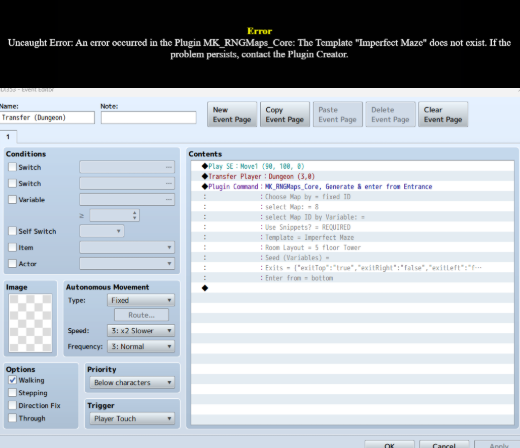
Hi,
Thanks for buying my plugin!
You must set whether you are using snippets or not where it says REQUIRED.
Hi Aero,
That indeed fixed my problem. I thought it was already filled in.
Thanks for the help!
Hey Aero. Love this plugin(so much) but I am having a problem with v3. I've used the previous version for years now so I am comfortable with how it works. I know I am missing something.
Since upgrading I get no response after calling the plugin command to generate and transfer, with no error in the console. The event turns to face the player, and test messages before and after the Plugin's command run but the plugin command does not.
I've tried this in a new project with only the four plugins packaged in the DL. I have tried calling a transfer command after the plugin command just to see(during my initial trial and error) and the map looks like it does in the editor.
The demo project works so I know it's operator error.
Hi Spiderbob,
I recently found out that the generator does nothing if the space map does not have any child maps (e.g. details, grass, ...). Internally, the generator waits as soon as all child maps are loaded - which obviously never happens.
It will be fixed soon. In the meantime, try adding a child map to your space map; it can be empty.
That was the problem. A blank child fixed it right up. :)
I had a guess you knew there was an issue judging by the RPGMakerWeb Forum post being locked.
Thanks for the response, your pluggy's are awesome and as a hobbyist just so much fun to play around with. The compatibility with Sandbox is nice as well.
*Edit: Just a peculiarity I found in my testing. If you don't have any child maps, and you set up the command to throw an intentional error it still does nothing. Since I got it to work(blank child map) it now throws an error under the same setup. To create the intentional error I set the "Template" parameter to one of the headers. I used "== SNIPPET-LESS ==" to test as my template.
I let the forum thread locked by myself because the forum rules don't allow paywalled plugins. While there's a free trial it doesn't allow exporting a game so I felt like I would exploit their rules.
That's also the reason why the Sandbox doesn't have a thread there.
Hello! I saw your plugin and it looks interesting, but after reading all the main features I'm not sure if it's what I was looking for so I'd like to ask.
Is this plugin only for generating random maps when you play like the binding of isaac or is it also for generating maps in the editor? I'm looking for a better "Generate Dungeon" option!
Hi!
It's for generating maps during playtime. Technically, you can export and save a generated map back into the editor while playing, so yes, you could also do that. You will find a "map export plugin" in the downloads. You can even use the free trial version to use this feature :)